
 Reefwise
Help
Join a club
Join your club with an invitation link or code, or find it, follow it and send your membership request for the current season.
What it is for
Being a member of a club in Reefwise gives access to its events, its polls and the dives its members share. There are two ways: the invitation link or code, which is immediate, and the membership request, approved by a club manager.
Before you start
- A Reefwise account, signed in (club features are not available in guest mode).
- An invitation link or code given by a club manager, or the name of the club to follow.
With an invitation link
A club manager can send you an invitation link (it starts with the address of the web space and ends with
/join?code=…). Tap it:
- on an iPhone with the app installed, the app opens on Invitation, with the code already filled in. Check it, then tap Join;
- otherwise, the web space opens. Sign in: the Clubs tab of your account opens with the code already filled in Invite code. Click Join the club.
Nothing happens without your confirmation: the link only fills in the code.
With an invitation code
- In the main menu, tap Join a club.
- Type the code in Invitation code, then tap Join.
- The message “You joined (club name).” confirms the membership.
In the web space, open your account, Clubs tab, type the code in Invite code (block Join a club with a code), then click Join the club.
You are a member of the current season right away, without waiting for an approval.
Without a code: follow the club, then ask to join
1. Follow the club
On the iPhone:
- In the main menu, tap Find a club.
- Search for the club by its name or town, then tap Ask to follow.
- The club shows “Request sent, waiting for the club”. The link Ask for my membership opens the season membership directly.
In the web space:
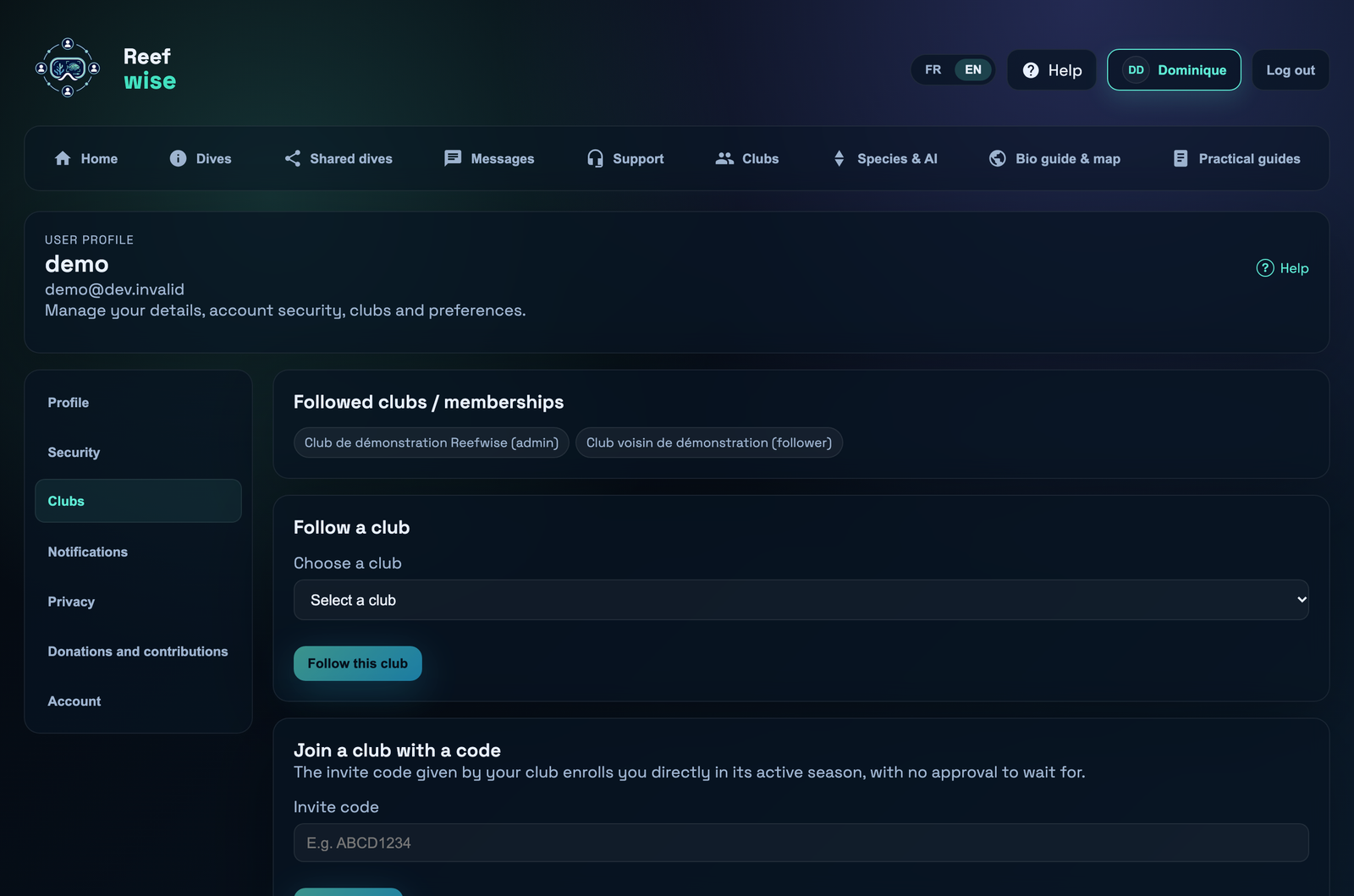
- Open your account by clicking your first name, at the top right, then the Clubs tab. Without a club, the Find a club button of the Clubs space leads there too.
- In Follow a club, pick the club in Choose a club, then click Follow this club.
- The club appears in the list Followed clubs / memberships, marked “awaiting the club’s approval”.
The club managers are told about your request by e-mail and by a notification on the iPhone.
Following a club is a request: a club manager accepts or refuses it. While it is pending, you see neither its events nor the dives shared with the club, but you can already send your membership request. Once the follow is accepted, you see the club's public events, its guides reserved for followers and the dives shared with it. To register for an event, you need to be a member.
Clubs tab of the account: followed clubs and choice of the club to follow
2. Send your membership request
- iPhone: menu Season membership.
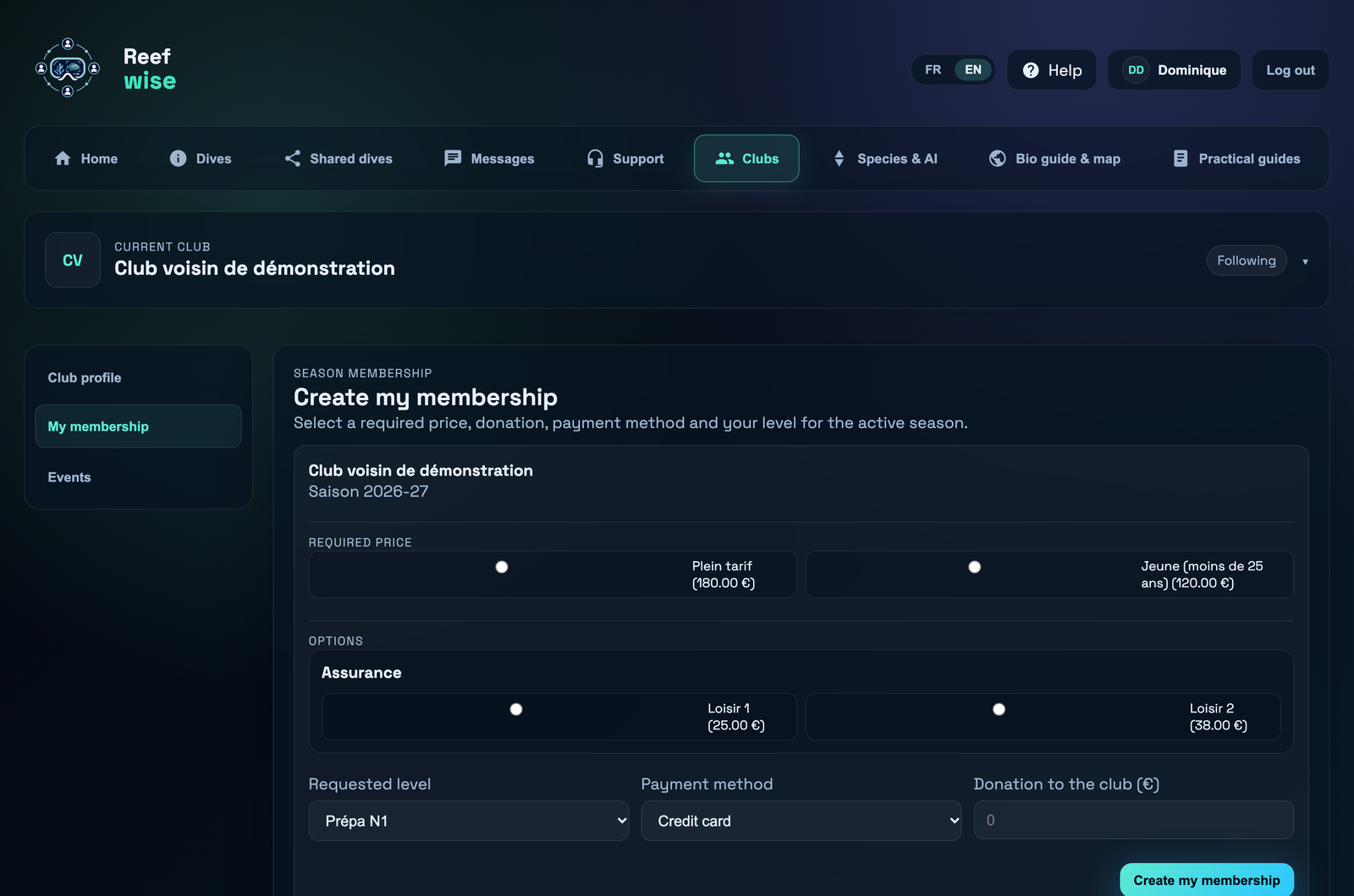
- Web space: Clubs, pick the club in the Current club switcher at the top of the page, then the My membership tab, block Create my membership.
In both cases:
- Choose the Required price, then any options.
- Give your Level and your Payment method (bank card, bank transfer, check, cash, other).
- Add a donation if you wish.
- Confirm with Create my membership. The message “Membership submitted for validation.” appears.
My membership tab: creating your membership for the season
Following your request
Your membership history shows where the request stands:
| Status | Meaning |
|---|---|
| In progress | The club has not approved it yet. You can still Edit it. |
| Validated | You are a member for the season. |
| Validated and prepaid / Validated and paid | The club also recorded your payment. |
No payment is made in Reefwise: you only state the payment method you chose, and you pay the club directly. When the club accepts or declines your request, you are told by e-mail and by a notification on the iPhone.
Good to know
- “Memberships are closed for this season.”: the club no longer accepts requests for the current season.
- A validated membership can no longer be changed in the app: contact the club.
- A membership is for one season. A new request is needed the next season. Without a new membership, you stay a follower of the club.
- An accepted membership or an invitation code also validates your follow of the club.
- When the club accepts your follow request, you are told by e-mail and notification. The club can also refuse a follow request, or withdraw the follow of someone who is not a member of the current season. You then receive an e-mail with the reason, and you can send a new request.
- On the club side, requests are answered on the iPhone (the club's members management, blocks Follow requests, Followers and Refused or withdrawn follows) as in the web space (block Club followers). A refusal or a withdrawal needs a reason, sent by e-mail.
- To send an invitation link, a manager creates a code then taps Share or Copy link on the iPhone, or clicks Copy link in the invitation codes window of the web space.
- If a code is refused, the message gives the reason: unknown code, expired, withdrawn by the club or already used as many times as allowed. Ask the club for a new one.
Going further
Once a member, see the page “Register for an event and answer a poll”.