
 Reefwise
Help
Suggest a species photo
Send your photos to illustrate a species page, understand how they are reviewed and the other ways to contribute with your images.
What it is for
Your photos can illustrate the page of a species in the Reefwise catalogue, visible to everyone on the public site. Each photo is reviewed by an administrator before it is published.
Before you start
- Photos you took yourself (or are allowed to publish), where the species is clearly visible.
- The agreement of the people who can be recognized on your photos.
- From the public site: no account is needed. From the web space: a Reefwise account.
- The iPhone app does not let you suggest a species photo.
Licence and credit
An accepted photo is published under the Creative Commons Attribution 4.0 (CC BY 4.0) licence: anyone may reuse it, including commercially, with the credit. Before sending, you tick three confirmations: you are the author of the photo (or allowed to publish it), you agree to the CC BY 4.0 licence, and the people who can be recognized agree. The licence and the date of your agreement are recorded with the photo.
You then choose the published credit, shown under the photo and on the Contributors page:
| Choice | What is published |
|---|---|
| Full name | The first and last name you typed (in the web space, otherwise those of your profile). Your username is never published. |
| Pseudonym | The pseudonym you typed, with no link to your account or your e-mail. |
| Anonymous | No name: the photo joins the “Anonymous contributors” page. |
The watermark writes this credit and the licence on the published photo; it is not offered for an anonymous photo.
A separate box, unticked by default, lets you agree that the photo may also train fish recognition. Without this agreement, the photo only illustrates the species page.
From the public site
- Open the species page and scroll down to the Contribution block, “Suggest photos”.
- Fill in First name, Last name and Email (required). They are used to write to you about your photos and are published only if you choose the full name credit.
- Add a Description (optional): location, behaviour, size. It is published with the photo.
- Choose one or more images in Image files: ten at most per upload, 20 MB per file.
- Tick the three confirmations of the Rights and publication block, then choose the Published credit.
- Click Send photos. The message “Thanks! Your photos are pending review.” confirms the upload.
From the web space
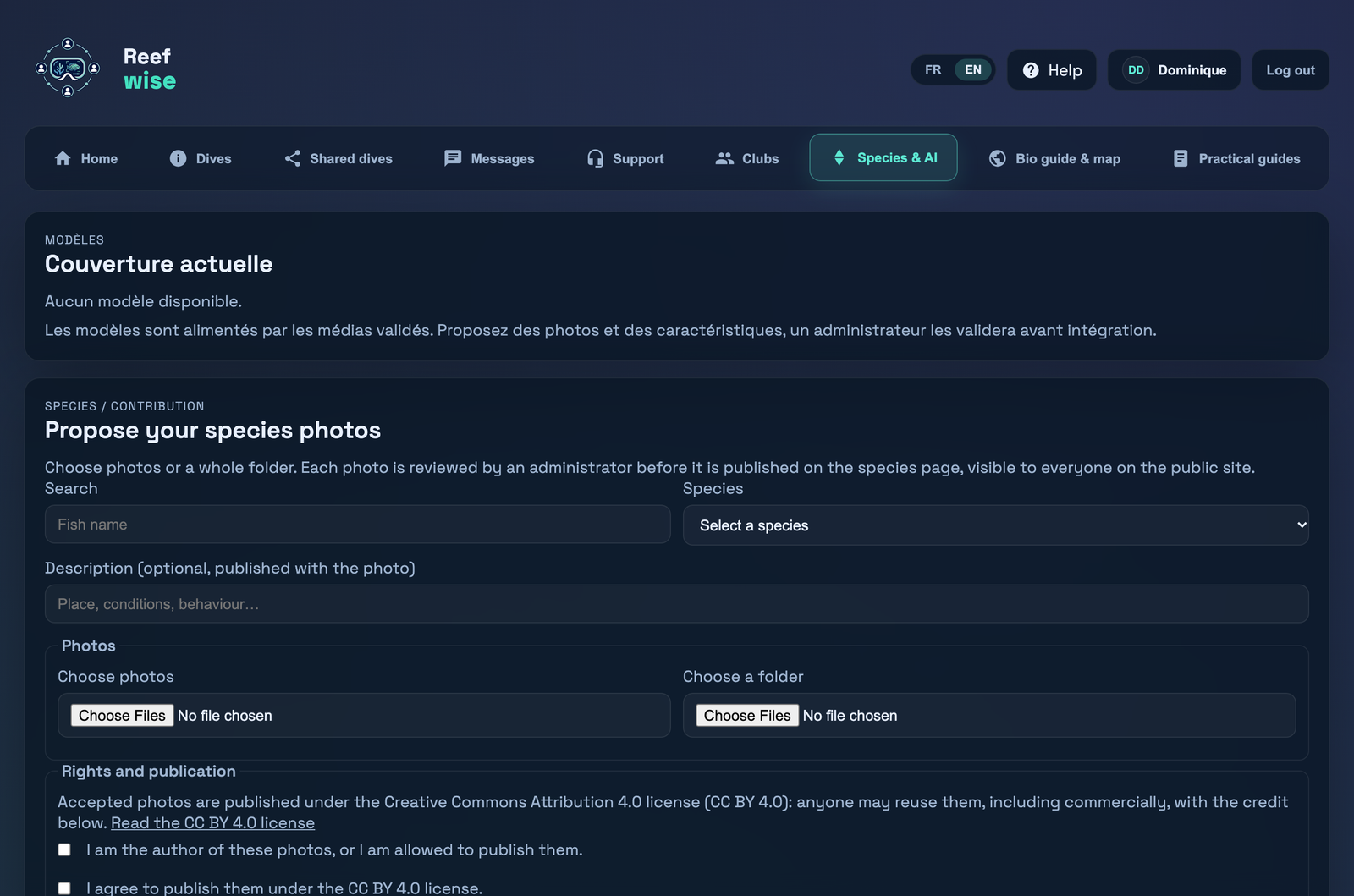
- Open Species & AI, block Propose your species photos.
- Search for the species and select it in Species.
- Choose your images with Choose photos (one or more) or Choose a folder (all its images). Files that are not images are skipped.
- Tick the three confirmations, choose the Published credit and, if you wish, the training agreement.
- Click Send the photos.
Species photo suggestion block of the web space
What happens to your photo
- It waits for an administrator's review, who accepts or refuses it. You are told the decision by e-mail (and by a notification on the iPhone if you have an account).
- Once accepted, it appears on the species page (public site and web space) and on the species map, with its credit and licence.
- With an account, the list My photo proposals, under the block of the web space, shows the state of each photo. Withdraw deletes a pending or published photo: it leaves the species page and the following training exports.
- Without an account, to have a published photo removed, use the report button placed on the photo, on the public site (“Request removal”).
The other ways to contribute
| You want to | Where | Good to know |
|---|---|---|
| Help improve recognition with your dive photos | iPhone: Settings, Better identification. Web space: account, Privacy tab, Contribute with my photos | Neither your name, nor the date or position are sent. You can withdraw your agreement at any time. |
| Suggest a photo to illustrate a practical guide | Web space: menu of a dive photo, Propose for the guides | You choose a licence, you are told the decision and you find your suggestions in the Donations and contributions tab of your account. |
| Have a photo removed from a species page | Public site: report button on the photo | An e-mail is sent to you if the photo is removed. |
Good to know
- Only images are accepted, not videos.
- The name of your files is never published: only the description you type is.
- Photos suggested before the licence and the credit choice were added stay published without a name (anonymous credit, watermark without a name), with the mention “license not specified”. They are still used to train fish recognition, as before.
- To remove a photo suggested before this change: from the web space, My photo proposals; without an account, “Request removal” under the photo.
- Uploads are limited: ten per hour from the public site, a hundred per hour with an account.
Going further
To have the species in your own photos recognised: see “Analyse a photo”. For your sharing and privacy choices: see “Manage your account and your data”.