
Equipment
Buying guide: dive computer
Wrist, watch, large screen or console: readability, algorithm, nitrox, transmitter, battery and logbook; pros, cons and manufacturers.
For information only: it replaces neither training supervised by a qualified instructor nor medical advice.
In short
A dive computer measures depth and time, continuously calculates the estimated tissue saturation and shows the stops, the ascent rate and the remaining no-decompression time. It is often the first major purchase after your personal equipment, because it follows you from one dive to the next. Choose it first for its readability and ease of use, then for its features (nitrox, transmitter, compass) according to your diving.
Why it matters
A computer that you read poorly or whose alarms you do not understand is a source of errors. Because it keeps the memory of your previous dives, it must be personal: a borrowed computer does not know your residual saturation. The dive computer guide explains in detail how it works and its limits.
Dive computers
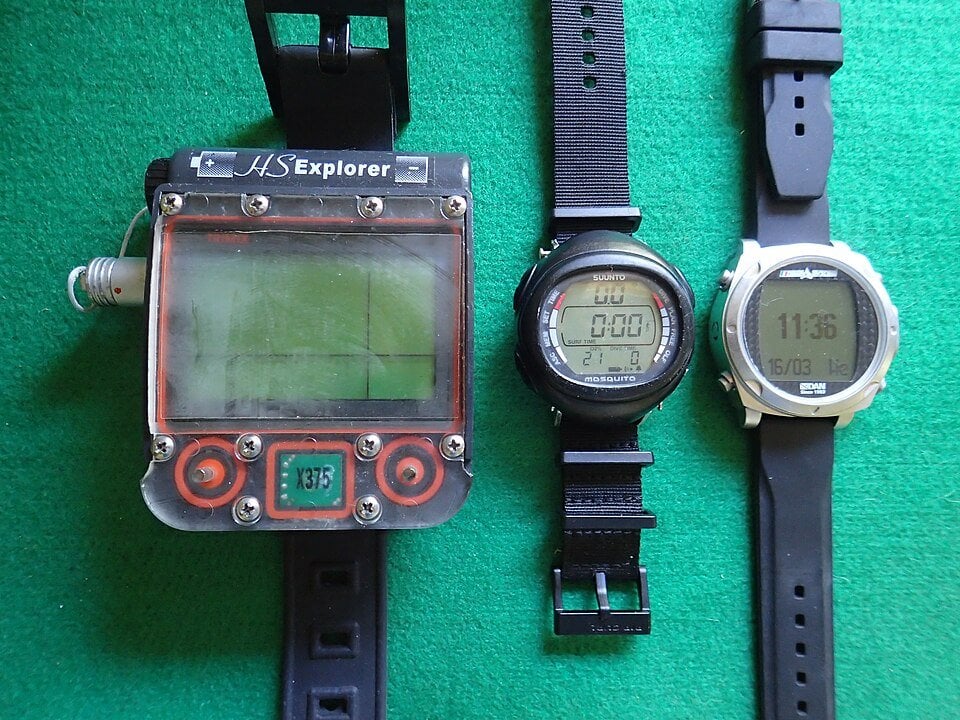
Formats
| Format | Advantages | Disadvantages |
|---|---|---|
| Wrist, round or square screen | Compact, affordable, often simple to use | Small screen, sometimes hard to read for long-sighted divers |
| Smart dive watch | Worn every day, tracks freediving and surface activity, easy syncing | Battery needs frequent charging; check battery life for trips |
| Large screen (mask or wrist) | Very readable, detailed menus, often multi-gas | Bulkier and more expensive |
| Console (built into the pressure gauge) | Everything in one place, nothing on your wrist | Follows the hose, harder to check constantly |
| Technical (multi-gas, rebreather) | Configurable algorithms, multiple gases, trimix | Features unnecessary for recreational diving; requires appropriate training |
Selection criteria
- Readability: digit size, contrast, backlight, readable without glasses if you are long-sighted.
- Buttons and menus: usable with gloves, logic that is easy to remember.
- Algorithm and settings: Bühlmann model with gradient factors, or the manufacturer's own model; option to make the computer more conservative. What matters is knowing the chosen setting and diving with the same one within the dive team.
- Nitrox: setting for the oxygen percentage and the maximum oxygen partial pressure, maximum operating depth (MOD) alarm. Most recreational computers handle at least one nitrox mix.
- Wireless transmitter ("air integration"): shows the cylinder pressure and the estimated remaining gas; the pressure gauge remains essential.
- Digital compass, freediving mode, gauge mode (no saturation calculation) according to your diving.
- Battery: user-replaceable battery or rechargeable battery; check the battery life in diving days and whether you can charge it when travelling.
- Logbook: transfer by Bluetooth or cable to an app; check compatibility with your phone and data export.
A computer estimates a risk based on a model: it does not guarantee that no accident will occur. Respect the ascent rate, the stops and the instructions of your dive supervisor, and do not switch computers in the middle of a series of dives.
Getting started with your computer
- Read the manual: alarms, stop display, nitrox settings and conservatism.
- Set the units, time, altitude and fresh or salt water if the computer asks for it.
- Do a first simple dive to get used to the display.
- Transfer your dives regularly to keep your logbook.
Some manufacturers
Non-exhaustive list, in alphabetical order, with no ranking and no sponsored or affiliate links. Check the current range on each manufacturer's website.
| Manufacturer | Official website | Range |
|---|---|---|
| Aqualung | aqualung.com | Generalist |
| Cressi | cressi.com | Generalist |
| Garmin | garmin.com | Dive watches |
| Mares | mares.com | Generalist |
| Scubapro | scubapro.com | Generalist |
| Seac | seacsub.com | Generalist |
| Shearwater | shearwater.com | Recreational and technical |
| Suunto | suunto.com | Computers and watches |
Key takeaways
- Readability and simplicity before the number of features.
- The computer is personal: it keeps the memory of your saturation.
- Nitrox, transmitter and compass according to your diving; the pressure gauge remains mandatory.
- Know its algorithm and its conservatism setting.
- Check the battery and the logbook transfer before buying.
Further reading
The dive computer guide and the decompression guide complete this guide. In the app, the dive logbook keeps your sessions, and the nitrox and Bühlmann preparation features help you prepare a dive; they replace neither the dive computer nor the instructions of your instructors.
Sources
- DAN Europe – Divers Alert Network Europe · consulted on 9 November 2026
- FFESSM – French Federation for Underwater Studies and Sports · consulted on 9 November 2026
- French Sports Code – Scuba diving (articles A322-71 onwards), Légifrance · consulted on 9 November 2026
Related guides
Buying guides: getting equipped to dive
Where to start, buying or renting, trying on, new or used, budget and maintenance: the method shared by all the diving equipment buying guides.
Dive computers
What a dive computer calculates, how to read its screens and alarms, how to set it up and use it, and what the app's watch does.
Understanding decompression
Dissolved nitrogen, ascent rate, stops, decompression sickness, MN90 tables and dive computers: understand it to ascend safely.
Diving with Nitrox
Enriched air mixes, oxygen partial pressure, maximum operating depth, oxygen toxicity, cylinder analysis and training.
Air management and out-of-air situations
Understanding your air consumption, planning your gas supply, watching your gauge, and reacting to an out-of-air situation or an equipment failure.